How to make a free website: what is actually free
You can publish a free website today without a credit card. Here is what is actually free, where the costs start and who a free plan is enough for.

Contents7
How to make a free website has a simple answer today: you can publish one without entering a credit card. But the word free only covers part of a site. The address, the email and the day your business starts to grow usually fall outside it.
A note first: I am the founder of Entrobase, a product that builds websites with AI and has a free plan. At PNZ Medya, my agency, we also build business websites with a team. I wrote this as someone who sees both sides, so keep that in mind as you read.
Below I go through the parts of a free website one by one. Some are actually free, some cost money later, and a free plan suits some people better than others. At the end I walk through how to make a free website with the Entrobase free plan, step by step.
What does it mean to make a free website?
A website has three parts. The first is the site itself: pages, design and text. The second is hosting, the server where the site's files live and get sent to visitors. The third is the address, the domain name.
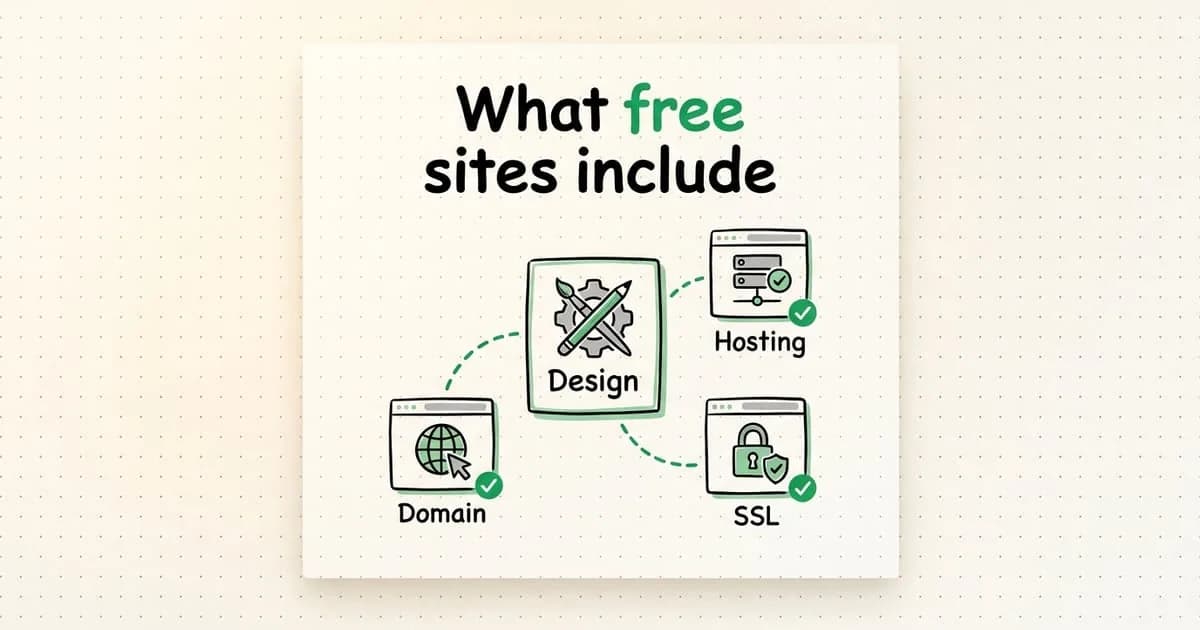
Free plans give you the first two parts and lend you the third under their own domain. Your site opens at an address like yourbusiness.platformname.com instead of yourbusiness.com. The SSL certificate that shows the padlock in the address bar usually costs nothing either. Let's Encrypt is a nonprofit that issues these certificates to anyone for free.
- Part
- Pages and design
- On a free plan
- Included; from a template or with AI
- When it starts to cost
- When you want more projects or sites
- Part
- Hosting
- On a free plan
- Included; on the platform's servers
- When it starts to cost
- When the number of live sites or usage grows
- Part
- SSL certificate
- On a free plan
- Usually included
- When it starts to cost
- Rarely costs anything
- Part
- Domain name
- On a free plan
- The platform's subdomain
- When it starts to cost
- When you want your own address, like yourbusiness.com
- Part
- Business email
- On a free plan
- Not included
- When it starts to cost
- When you want an address like [email protected]
Where does a free website start costing money?
Getting a free site live is not the hard part. Costs usually show up once the site starts doing real work. These are the four I see most often:
- Your own domain is paid yearly. The first-year price and the renewal price are often different, so check both.
- A business email address like [email protected] does not come with the domain; you pay an email service for it separately.
- A second site, more images, a database to store form submissions or online sales usually start on paid plans.
- Real photos, prices and service descriptions never come ready on any plan. Writing them takes your time.
A prompt that calculates your first-year cost
Does a platform's free plan cover what you need, and if not, what will the first year actually cost? Give the prompt below to any AI assistant, together with the text you copy from the platform's pricing page.
I am going to build a website for a business and I am thinking of starting on a free plan. Below I paste the plan details I copied from the platform's pricing page and a list of what I need.

Plan details: [paste the pricing page text here]
What I need: [e.g. my own domain, 2 business email addresses, a contact form, 5 pages, 20 images a month]

What I want from you:
1. Which of my needs does the free plan cover and which does it not? Show this as a table.
2. For the ones it does not cover, tell me which plan or add-on service I would need.
3. Calculate the total cost of the first year and the second year separately; show domain renewal and tax on separate lines.
4. Do not guess about anything the plan details do not mention. Mark it as "unclear" and write the question I should ask the platform.The last instruction is the most useful part. Do not let AI fill a limit that is missing from the pricing page with a guess; ask the platform itself.
Subdomain or your own domain?
The platform's subdomain is enough to test an idea. You send the link, the site opens, people see it. Google can index sites on subdomains too.
The problem shows up on moving day. If you move the site somewhere else, the subdomain stays with the old platform. The address on your business cards still points there. So do the links you shared on social media and the links other sites gave you.
I have worked on SEO since 2015. Redirecting old links one by one after a site changes its address is a separate job, and it is not always possible. With your own domain, the address stays with you whichever platform the site runs on. That is why I treat the domain as the first expense for any business website.
Who is a free plan enough for?
Think of a free plan as a place to try things. People want to see something working before they decide. A free plan is the way to show that working thing without spending money. It is usually enough for:
- Showing a business idea to people and seeing how they react
- A personal page, a resume or a portfolio
- A wedding, an event or a one-off campaign page
- A working example to show an agency or a developer what you want
Where it falls short is a business site that serves customers. A customer sees your address on a business card, an invoice or an ad, and expects your company name there. Needs like payments, bookings or several languages are also usually covered by paid plans or by custom software.
I wrote a separate piece on what AI builds quickly on a website and what it still leaves to you.
How to make a free website with Entrobase
Here is how the free plan works in my own product. The Entrobase free plan does not ask for a credit card and gives you one live site on an entrobase.site address.
- Create an account at entrobase.ai; the free plan does not ask for card details.
- Start from a template or describe your site in a few sentences: what you do, who you serve and which pages you need.
- Open the preview on a computer and on a phone and click through it. In Entrobase the preview is the same build that goes live, so what you see there is what visitors will see.
- Replace the sample text and images with your own details: services, opening hours, address, phone number and photos.
- Press the publish button. The site opens on your entrobase.site address with an SSL certificate.
- When you want your own domain, move to a paid plan. You can buy a domain inside Entrobase or connect one you already own.
Step four is the one people skip most often. AI builds an average site for your industry very well, and it fills empty spots with information that looks plausible. Before you publish, check yourself that every detail on the site is correct.
Let me also be clear about the limits. I checked the pricing page on October 15, 2026. The free plan includes 1 web project, 1 live site on an entrobase.site address and 10 image credits a month. It has no custom domain and no mobile apps. Downloading the site's source code also starts on a paid plan.
For a small business that wants its own domain, the right step is the Starter plan. It costs $14 a month before tax and adds two custom domains and code download. Mobile apps start with the Pro plan at $20 a month. Prices can change, so check the current pricing page before you decide.
Questions to ask before choosing a free platform
When choosing a tool, the first question should be: who keeps the code and the domain?
On some platforms the site lives only inside that platform. If you want to leave, you have to rebuild everything. Before you pick a free plan, get answers to these questions:
- On which plan can I connect my own domain, and whose name will the domain be registered under?
- Can I export the site's code or content, and on which plan does that open up?
- Does the free plan add the platform's ads or logo to my site?
- When I move to a paid plan, does the same site continue, or do I rebuild it?
- If I cancel, what happens to the site and the data?
Here is my answer for my own product. In Entrobase the code always belongs to the user. On a paid plan you can download the project as a ZIP whenever you want. If you choose another platform, ask it for the same answer.
frequently asked questions
Can you really make a website for free?
Yes. Many platforms give you design, hosting and an SSL certificate for free and publish the site on their own subdomain. Costs begin the moment you want your own domain and a business email address.
Will a free website show up on Google?
It can; Google indexes sites on subdomains too. Adding the site to Google Search Console and submitting a sitemap helps Google find your pages. Ranking then depends on how well each page answers the search.
Can I connect my own domain to a free website?
On most platforms this opens up on paid plans. The Entrobase free plan has no custom domain; from the Starter plan up, you can connect your own.
Can I make a free website without coding?
Yes. You can start from a template or by describing your site to AI. Checking that the text, prices and contact details are correct is still your job.
Starting with a free site is a good way to see an idea working without spending money. But 'the site is ready' and 'the site is doing its job' are two different things. Once your business expects customers from the site, spend first on your own domain. Register it in your own name and add the rest as the need comes.